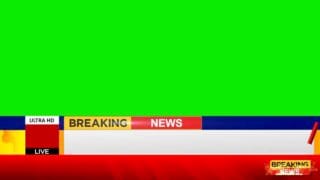
FREE Split Screen News Green Screen Template Download (1080p)
MTCVFX designed this professional split screen news_green screen template to help content creators, video editors, and journalists host side-by-side interviews effortlessly. Consequently, you can download this high-quality broadcast overlay asset to present dual live feeds or simultaneous news reports with high precision.
Split Screen News Green_Screen Technical Details
Resolution: 1920×1080 (Full HD)
Aspect Ratio: 16:9 Standard Widescreen
File Quality: High-bitrate video render featuring sharp green key edges for smooth background removal
Software Compatibility: Adobe Premiere Pro, After Effects, DaVinci Resolve, CapCut, and Final Cut Pro
Detailed Breakdown of the Split_Screen News Green Screen Design
1. Dual Equal-Sized Chroma Key Windows
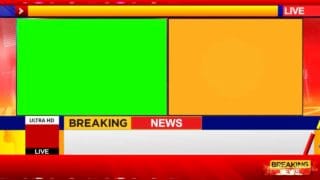
Side-by-Side Screen Layout: Unlike single-window setups, this version features two wide, perfectly balanced split screen news green screen boxes divided down the center. As a result, you can display a anchor alongside a field reporter or compare two live video sources together.
Clean Framing & Borders: Sleek dark borders frame both green screen windows cleanly, keeping your media separated from the bright red background.
2. Dynamic Graphic Bars and Text Displays
Top Header Bar: First, a strong red and blue top banner features a bright red LIVE indicator badge pinned in the upper-right corner.
Animated Lower Thirds: In addition, a bold red BREAKING NEWS banner stretches across the bottom portion of your screen.
Info Ticker Bar: Meanwhile, a white-and-blue status ticker sits directly underneath the main banner. Animated text elements automatically transition through dynamic markers like “U R watching”, “Web TV”, “ULTRA HD”, “Channel”, and “#1”.
Side Status Box: Finally, an active red-and-black corner box in the bottom-left corner flips status markers continuously to maintain an active studio atmosphere.
Easy Editing with Split Screen News Green Screen Keying
First, import this 1920×1080 HD video template into your editing timeline. Next, apply your video editor’s Chroma Key or Ultra Key tool to knock out the two green screen sections. After that, place your two separate video clips on lower tracks and align them into each frame.
Download Your Split Screen News Green Screen Template Today
You can grab this template file directly from wemtc.com. Additionally, check out our other free video editing templates to enhance your newsroom productions. However, if you want to download and experience the full video in crisp 4K resolution, visit our official YouTube channel at youtube.com/mtctutorials.