
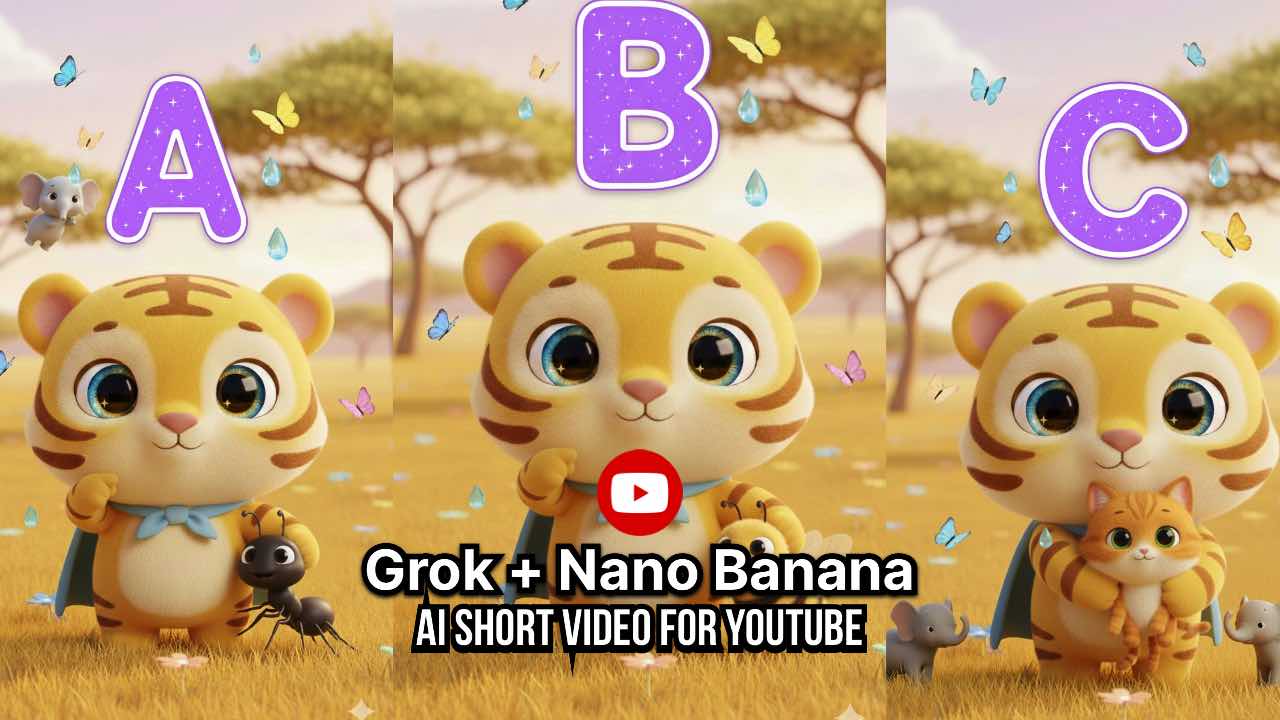
Many creators today want to make short teaching videos for small kids. These videos help children learn letters, words, and simple ideas in a fun way. On WeMTC we always try to help creators find easy methods to create good content. To begin, this article explains how you can use two smart AI tools, Nano Banana and Grok Imagine, to create a short ABC learning video. Moreover, the steps are simple, and any beginner can easily follow them.
I will also share ready prompts that you can use for your project. These prompts create one image and then turn that image into a short five second animation. At the end of this article, you will understand the full process very clearly.
This article is written in easy words. Even a student from class five can understand every line. It uses an active tone most of the time and stays clear and friendly. If you want to teach letters or want to create ABC Videos for YouTube Shorts then this guide will help you from the first step to the last.
Why Use AI Tools for ABC Learning Videos
AI tools save time. They create smooth and cute cartoon art. They make animation easy. A creator can build a full short video in a few minutes. Earlier this work required a big team but now one person can do it alone. That is why AI tools like Nano Banana and Grok Imagine are becoming very popular.
To begin, Nano Banana makes high-quality images. After that, Grok Imagine takes the image and creates animation. Finally, they work perfectly together for short vertical videos.
Why Vertical Videos Work Better for Kids
Most kids watch content on mobile phones. Vertical videos fill the full screen and look more clear. Kids can focus easily on a single picture because there is no extra background. This is why many learning channels upload vertical Shorts. These short videos keep children active. The content is small and fun.
What You Will Learn in This Article
In this long guide you will learn
- How Nano Banana helps you create an image
- How Grok Imagine turns the image into a five second animation
- How to use YouTube Shorts titles and descriptions
- Why this format works well for preschool kids
- How to use the prompts that are given below
- How to improve the video for future letters
- How to use this same idea in other languages
Now let us start with the main part.
Step One Create the Image Using Nano Banana
First, to start your YouTube Short, you need one perfect image. Next, Nano Banana creates this image for you. Then, the prompt below is ready to copy and paste. As a result, it makes a tall image in 1080 by 1920 size. Finally, this size is perfect for YouTube Shorts.
Nano Banana Prompt for Image
Gemini Prompt Letter E for Elephant
Generate a 1080x1920 vertical image for YouTube Shorts. Super cute chubby baby tiger with bright yellow orange fur, huge sparkling blue eyes, tiny pink nose, and light blue superhero cape tied around his neck. He is standing happily in the center of a sunny savanna, proudly pointing at himself with one paw and gently hugging a tiny gray baby elephant with big floppy ears on his other paw. Above his head floats a giant friendly capital letter E in bright purple with white outline and tiny sparkles. A few playful baby elephants, colorful butterflies, and soft water droplets gently float around. Clean magical savanna background with golden grass, acacia trees, flowers, and warm morning sunlight. Ultra rounded fluffy cartoon style, pastel colors, very kid friendly, smooth 3D look, lots of headroom and footroom for animation, perfect for preschool learning Letter E for Elephant.
Small text on left bottom corner “Prompted By: w e  m t c . c o m”
Why This Prompt Works Well
This prompt gives clear details. It tells the AI about colors, characters, background, and style. The image looks soft and friendly. Small kids love cute animals. When children see the letter E above the tiger they will remember it easily. The tiny elephant makes it more fun because the letter E is linked with Elephant.
The prompt also gives space in the top and bottom area. This makes animation smooth because Grok Imagine can move the characters and add simple actions.
Step Two Animate the Image Using Grok Imagine
Once the image is ready you can move to the next step. Grok Imagine creates a small animation. A short five second video is enough for YouTube Shorts because it catches attention and loops nicely.
Here is the ready animation prompt.
Grok Imagine Prompt for Animation
Animate a five second 8K vertical 1080x1920 short. Super cute chubby baby tiger with bright yellow orange fur, huge sparkling blue eyes, tiny pink nose, and light blue superhero cape stands happily on a sunny savanna, pointing at himself with one paw while gently hugging an adorable tiny gray baby elephant with big floppy ears on the other paw. A giant friendly purple capital letter E with white outline and sparkles floats above his head, playful baby elephants and colorful butterflies softly float around. He smiles super big, bounces once with excitement, and clearly says in a cheerful high pitched little kid voice. This is letter E. E is for Elephant. The baby elephant lets out two super cute high pitched baby elephant trumpets with soft brrr brrr sounds, flaps its big ears happily, and swings its tiny trunk. Cape waves. No background music at all, completely muted. Only sound effects. Two adorable baby elephant trumpets with brrr brrr sound, ear flap whoosh, sparkle twinkles, gentle breeze whoosh, trunk swing swish, and a happy tiger rawr giggle at the end. Ultra rounded fluffy cartoon style. Pastel savanna with golden grass and warm sunlight. Perfect for American preschoolers learning ABCs.
Small text on left bottom corner “Prompted By: w e  m t c . c o m”
Why This Animation Prompt Works
The prompt explains actions clearly. The tiger talks. The elephant makes sounds. The cape moves. These details help the AI create a lively scene. Children listen to simple voices. They enjoy soft animal sounds. The script uses gentle words. The animation stays clean because there is no background music. Only cute sound effects play. This keeps full focus on the letter E.
Step Three Use the Best Title for YouTube Shorts
Every YouTube Short needs a title. You already have one. I rewrote it here without emojis.
New Title for youtube video
Letter E is for Elephant Super Tiger Tots ABCs for Kids
Why This Title Works
Simple. Clear. Uses the main keyword Letter E. Also mentions ABCs for Kids. Parents search these words often. Kids channels use simple titles. This title is easy to read and looks clean.
Step Four Add a Short Description
A short description tells viewers what the video teaches. Here is the description in clean text without emojis.
Description for YouTube video
Super Tiger teaches the letter E today. E is for Elephant. This short video is great for toddlers, preschoolers, and kindergarten kids who want to learn their ABCs. This video is best for ages two to six. Subscribe for a new letter every week.
#SuperTigerTots #LetterE #ABCsForKids #PreschoolLearning #LearnLetters #ToddlerABC #KidsCartoons #ElephantSong
Why This Format Works for Preschool Videos
Small kids understand simple characters. They like bright colors. They remember letters when an animal speaks to them. A tiger and an elephant make learning fun. The short length keeps kids focused. Many parents prefer safe and calm videos. These videos have soft actions and peaceful sounds.
How You Can Use This Method for Other Letters
To begin, this method does not stop at the letter E. Furthermore, you can create a full series. In addition, use the same tiger character for the whole alphabet. Next, change the letter. Then, change the animal. Finally, use the same prompts and simply replace the details.
For example
- Letter A Apple
- Letter B Bear
- Letter C Cat
- Letter D Duck
- And many more
Tips To Improve Your YouTube Shorts
Here are a few more helpful tips.
- Keep the color theme simple
- Use one animal per video
- Keep the voice soft
- Use short sentences
- Keep the clip between three and seven seconds
- Add clear sound effects
- Upload new videos regularly
- Use clean tags
- Repeat the main letter in the video script
- Keep your thumbnails very simple
These tips help your videos reach more children and parents.
Why This Process Works for Beginners
Many new creators feel confused about animation. AI tools remove that fear. They do the heavy work. You only need to write a correct prompt. Both tools handle drawing, animation, lighting, and color. You can focus on teaching. You can create a full ABC series in a short time.
Future Plans for This Series
You can extend this project to numbers, shapes, colors, fruits, and animals. Each lesson can follow the same style. Children love familiar characters. If the tiger becomes a hero for kids then they will return to your channel again and again.
Final Thoughts
AI tools like Nano Banana and Grok Imagine make teaching easier. They create cute and smooth learning videos. These videos engage small kids and help them understand letters in a simple way. The steps in this guide show how you can create a full YouTube short from an idea. First use Nano Banana for the image. Then use Grok Imagine for the animation. At the end upload the video with a simple title and description.
If you follow this method for every letter you will soon have a full ABC series on your YouTube channel. It will help many children learn in a fun and friendly way.
Extra Note for Creators
If you want to make your content better you can add small stories. For example the tiger can talk about colors or shapes. Now You can add very light movements. You can also create a small intro clip for your channel.
You can also use these prompts on more than one platform. This method works on YouTube Shorts, Instagram Reels, TikTok, Facebook Reels, and even your own website WeMTC.
FAQ
Nano Banana is an AI tool that creates high quality images from text prompts. It helps you make cute and colorful pictures for kids learning videos. You only need to write one clear prompt and the tool creates the full image.
Grok Imagine is an AI animation tool. It takes the image you created in Nano Banana and turns it into a short animated clip. It adds movement, voice lines, and sound effects.
Yes. These prompts are very simple. Beginners can copy and paste them to create a full YouTube Short without any advanced skills.
The best size is 1080 by 1920. This vertical format fills the whole phone screen and looks clear for kids.
Yes. You can follow the same steps for all letters from A to Z. Keep the same tiger character and change the letter and the animal each time.
Yes. You can change the spoken line in the animation prompt. You can also replace the English word with the word in your language. The rest of the prompt stays the same.
No. Very young kids learn better with simple sounds. The animation prompt already includes soft and cute sound effects that help children focus on the letter.
Yes. You can upload the same short video on YouTube Shorts, Instagram Reels, Facebook Reels, and TikTok.
Yes. You can choose any cute animal. But using the same character in all videos helps children remember and feel connected.
Try to upload one new letter every week. Regular posting helps your channel grow and keeps kids waiting for the next lesson.